In the field, hunt solo by scouting with your handheld binocular or monocular, then aiming through your riflescope after locating your target. For a two‑hunter team, one scans for game while the other prepares to shoot.
But here’s the reality — calling distances by voice means mishearing and repeating yourself, and your spoken calls can easily spook nearby prey. Solo hunters are troubled by constant device‑switching, inaccurate range judgement and flawed ballistic calculations. After spotting game on the binocular, you may struggle to pinpoint the same target in‑scope. Several targets at different spots may also cause confusion, and by the time you lock onto your quarry, the animal is gone.
CrossLink was built to fix exactly this.
Two Pixfra devices connect wirelessly for real‑time sharing of LRF data, ballistic data and live footage. Range measurements taken by the spotter’s Draco binocular are instantly sent to the shooter’s Cetus scope, with its live‑view stream also available for display.
No shouting, no guessing, no switching back and forth between devices.
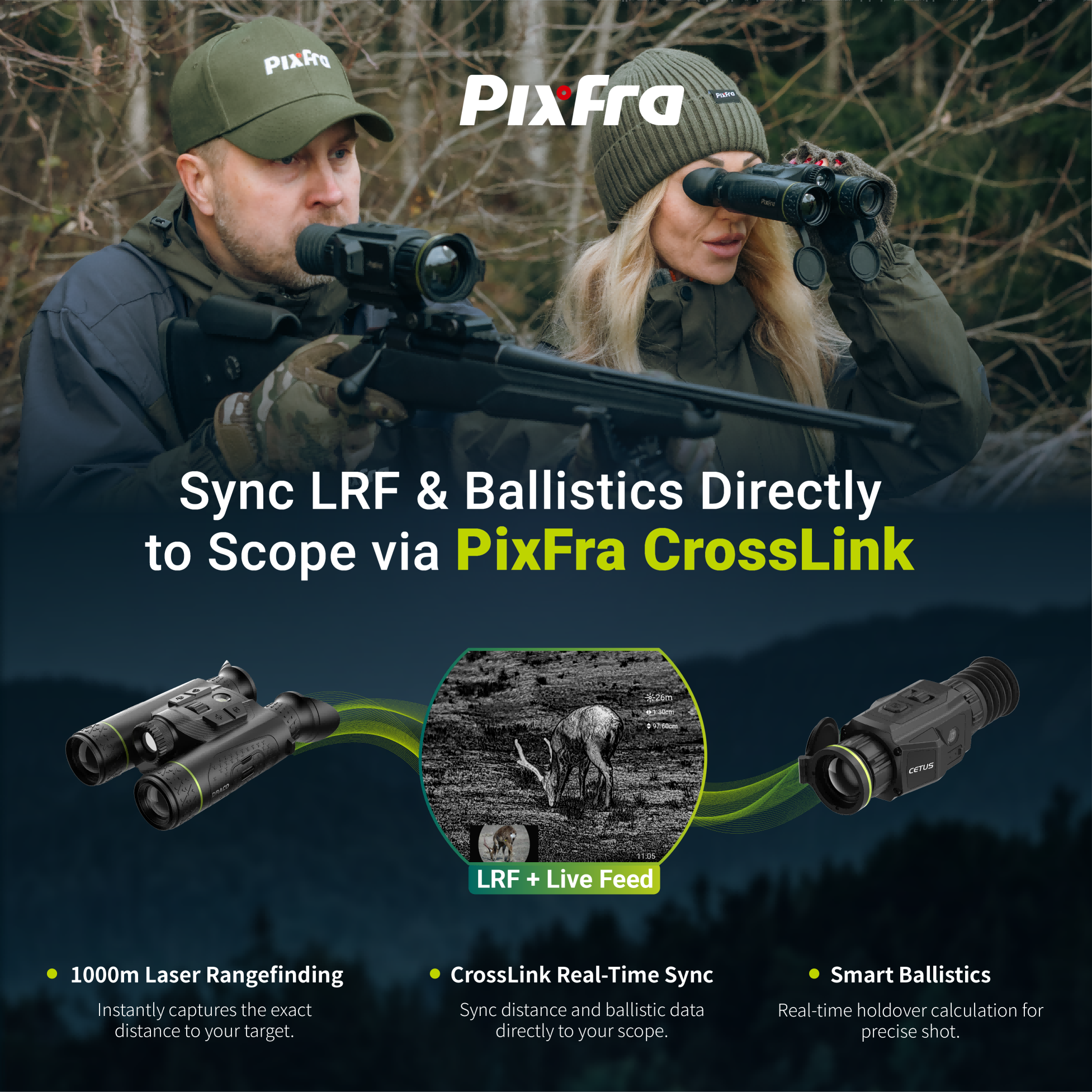
Think of it as a wireless bridge between your Pixfra binocular (such as Draco) and thermal scope (such as Cetus).
Here’s how it works in practice:
You’re scanning a hillside with your Draco binocular. You spot a deer 800‑yards away. One tap on the LRF button sends range data straight to your partner’s Cetus riflescope.The scope displays the measured distance, computed ballistic offset data and the live‑stream view from your Draco.The shooter needs no manual‑range finding, target searching or ballistic math. Adjust the standard cross‑hair according to the ballistic offset reading and take the shot.
One person finds, one person shoots. Ranging and ballistics sync automatically.
Conventional‑style hunting is often hampered by cumbersome device handling, ambient noise and poor information exchange between partners.
Thanks to wireless interconnection, your Draco binocular can instantly send ranging readings, ballistic computation data and live thermal imagery to the Cetus scope.
Stand‑out advantages:
✅ Save precious seconds between spotting game and preparing to shoot
✅ Improve hit accuracy with automatic ballistic computation and fewer manual mistakes
✅ Equip your Cetus with ranging and ballistic features without an in‑built rangefinder
✅ Allow you to stay focused on searching and tracking moving prey
✅ Easy‑to‑use for beginners, no complicated ballistic charts to memorise
Bottom line:
CrossLink makes your two Pixfra gadgets work as one integrated system. Current Cetus users can activate laser‑ranging and ballistic‑calculating capacity by pairing a Draco, instead of buying a brand‑new rangefinder riflescope.
CrossLink is presently compatible with our flagship Draco and Cetus combination. More monoculars and scopes will receive support in the future:
| Device | Type | Role | What it does |
| Draco | Multispectral Binocular | Sender | Transmits LRF data, ballistic calculations, and live video feed |
| Cetus | Thermal Scope | Receiver | Displays range, ballistic holdover, and can view Draco’s live stream |
If you already own the Draco + Cetus kit, you’re basically getting a major new feature for free. No new hardware needed.
Draco (sender):
Cetus (receiver):
Once connected, every range measurement from the Draco updates on the Cetus in real time, with automatic ballistic calculation. You can also switch to live view mode to see exactly what the Draco is seeing.
Q: I cannot locate the CrossLink menu option on my device
A: Please confirm you are using the supported pairing (Draco binocular as sender and Cetus scope as receiver. If compatible but the option‑is absent, update Draco firmware to 260806 or above and Cetus to 260805. Both devices require the latest firmware to enable CrossLink.
Q: Why does my Cetus fail to display LRF data?
A: Ensure CrossLink is enabled and you have established a successful connection with your Draco. Activate the LRF function on the Draco, and the data will then appear on the Cetus screen.
Q: Can I connect third‑party optical devices through CrossLink?
A: CrossLink is a proprietary Pixfra‑exclusive feature and incompatible with hardware manufactured by other brands.
Q: What device combinations are supported by CrossLink?
A: At present, CrossLink only works with the pairing of a Draco binocular as the data sender and a Cetus scope as the receiver.
Q: Is one Draco binocular allowed to link up with several Cetus scopes?
A: For stable‑quality data transmission, one‑to‑one connection is recommended at the current stage.
Q: Can my Cetus scope connect to multiple sender devices at once?
A: Each Cetus receiver can only maintain one active CrossLink connection to a single Draco binocular at any given time.
Q: Will continuous LRF data get transmitted via CrossLink?
A: We now support both triggered and continuous LRF‑ranging modes. Provided LRF‑data is activated on the Draco, both ranging information and live‑view footage will be transmitted in real‑time to the paired Cetus while connected.
Q: What is the reliable wireless working distance for CrossLink?
A: The stable effective transmission distance is roughly 3 meters. Keep both devices within arm’s reach during your outdoor‑hunting activities.
What makes everyday‑usable thermal optics stand out comes down to practical little details, rather than raw specifications.
CrossLink is no revolutionary piece of tech. It solves one real‑world hunting headache: easily sharing laser‑range readings and on‑site target awareness across your gear, whether you hunt solo or with a partner.
Existing Draco‑Cetus owners only need a simple firmware upgrade to unlock CrossLink at zero extra cost, which completely reshapes your hunting workflow.
Those assembling your Pixfra gear collection now have another great motive to match your devices. A single LRF‑ready binocular transmits data straight to your riflescope, removing the need for duplicate hardware and unnecessary functions.
Simply update your firmware and test out CrossLink for your next hunt.