















In the field, solo hunters usually scout with a handheld binocular or monocular, then switch to a riflescope after locating the target. In a two-hunter team, one person scans for game while the other prepares to shoot.
But here is the reality: calling out distances by voice can lead to miscommunication and repetition, while spoken calls may easily spook nearby prey. Solo hunters also face constant device switching, inaccurate range estimation and complicated ballistic calculations.
After spotting game through a binocular, you may struggle to locate the same target through your scope. Multiple targets in different positions can create even more confusion—and by the time you lock onto your quarry, the animal may already be gone.
CrossLink was built to solve exactly these problems.
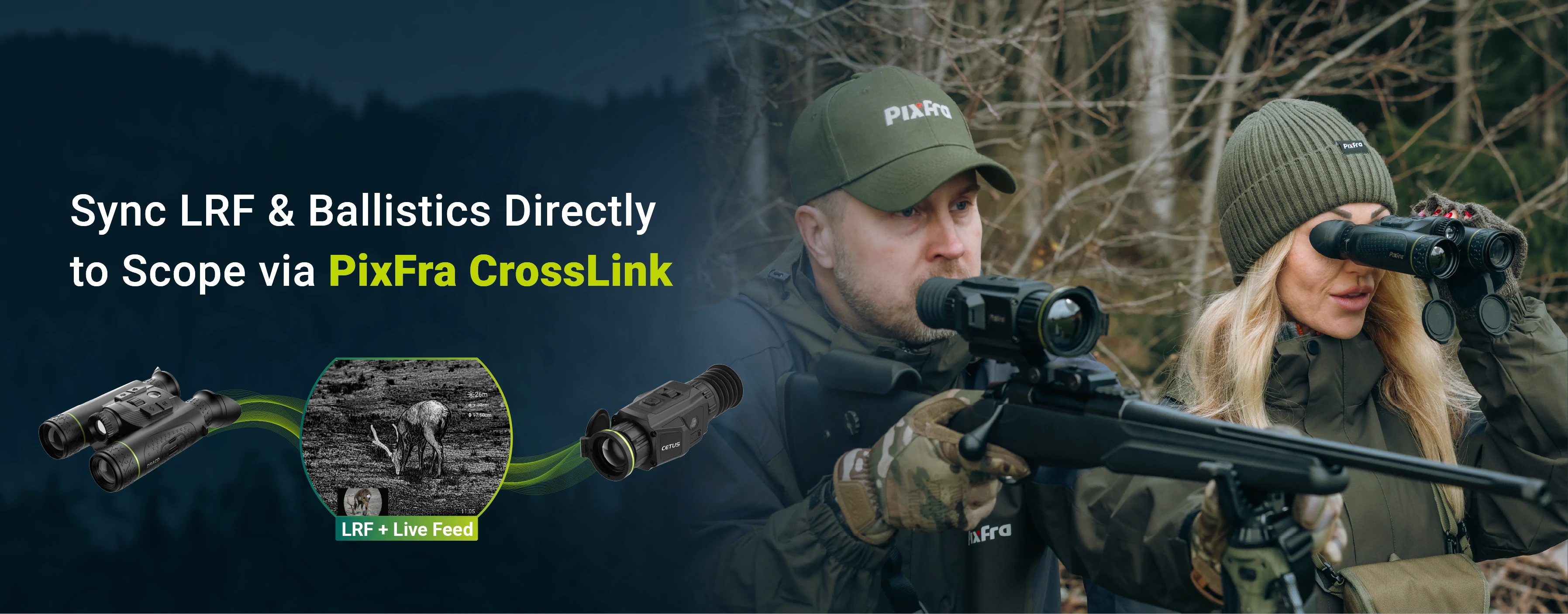
Two compatible Pixfra devices can connect wirelessly to share LRF measurements, ballistic data and live footage in real time. Range measurements taken with the spotter’s Draco binocular are instantly transmitted to the shooter’s Cetus scope, along with the option to display Draco’s live-view stream.
No shouting. No guessing. No switching back and forth between devices.

What Exactly Is Pixfra CrossLink?
Think of CrossLink as a wireless bridge between your Pixfra binocular, such as Draco, and your thermal riflescope, such as Cetus.
• Draco binocular—the sender: Surveys the surroundings, takes LRF measurements, calculates ballistic-offset data and streams its live digital and thermal view.
• Cetus riflescope—the receiver: Receives the transmitted data and displays the measured distance, calculated ballistic offset and Draco’s real-time video feed. The scope’s original crosshair reticle remains unchanged.
• Direct Wi-Fi connection: No router or smartphone is required, allowing the system to work directly in the field.
How It Works in Practice
You are scanning a hillside with your Draco binocular when you spot a deer 800 yards away. One press of the LRF button sends the measured distance directly to your partner’s Cetus riflescope.
The scope displays the distance, calculated ballistic offset and live-stream view from Draco. The shooter does not need to perform manual rangefinding, search for the target again or calculate the ballistic data separately.
Simply adjust the standard crosshair according to the displayed ballistic-offset reading and prepare to take the shot.
One person spots. One person shoots. Ranging and ballistic data synchronise automatically.
Why Pixfra CrossLink Improves Your Hunting Experience
Conventional hunting workflows are often affected by cumbersome device handling, environmental noise and inefficient information exchange between partners.
With CrossLink, the Draco binocular can instantly transmit ranging measurements, ballistic calculations and live thermal imagery to the Cetus scope.
Standout Advantages
• Save valuable time between spotting game and preparing to shoot.
• Improve accuracy with automatic ballistic calculations and fewer manual errors.
• Add ranging and ballistic capabilities to your Cetus without requiring a built-in laser rangefinder.
• Stay focused on searching for and tracking moving prey.
• Enjoy a beginner-friendly workflow without complicated ballistic charts to memorise.
Bottom line: CrossLink enables two Pixfra devices to operate as one integrated system. Existing Cetus users can unlock laser-ranging and ballistic-calculation capabilities by pairing their scope with a Draco binocular, instead of purchasing a completely new rangefinder riflescope.
Which Pixfra Devices Support CrossLink?
CrossLink currently supports the flagship Draco and Cetus combination. Support for more Pixfra monoculars and scopes may be added in the future.
| Device | Type | Role | What It Does |
|---|---|---|---|
| Draco | Multispectral Binocular | Sender | Transmits LRF measurements, ballistic calculations and a live video feed. |
| Cetus | Thermal Riflescope | Receiver | Displays the measured distance and ballistic holdover, with the option to view Draco’s live stream. |
If you already own a Draco and Cetus combination, you can unlock this major new feature through a firmware update, with no additional hardware required.
How to Use the Pixfra CrossLink Function
Operation Steps
On Draco—the Sender
1. Enter Main Menu → Wi-Fi.
2. Select 2.4 GHz or 5 GHz.
3. Confirm that the Wi-Fi hotspot is active.
On Cetus—the Receiver
1. Enter Main Menu → CrossLink, then select Open.
2. Open Device Search and scan for available Draco devices.
3. When connecting for the first time, enter the Draco Wi-Fi password and complete the connection.
4. Switch Sub-Display on or off, depending on whether you want Draco’s live feed to appear on the Cetus.
5. Once the connection succeeds, CrossLink is ready to use.
After the devices are connected, every range measurement taken by Draco will update on Cetus in real time, together with the corresponding ballistic calculation. You can also enable the live-view display to see exactly what the Draco user is seeing.
CrossLink FAQs
I cannot find the CrossLink menu option on my device. What should I do?
First, confirm that you are using a supported combination: a Draco binocular as the sender and a Cetus scope as the receiver.
If your devices are compatible but the CrossLink option is missing, update Draco to firmware version 260806 or later and Cetus to firmware version 260805 or later. Both devices must be running the required firmware to enable CrossLink.
Visit the Pixfra Download Center
Why does my Cetus fail to display LRF data?
Make sure CrossLink is enabled and that Cetus has successfully connected to Draco. Then activate the LRF function on Draco. The ranging data should appear on the Cetus screen after a measurement is taken.
Can I connect third-party optical devices through CrossLink?
No. CrossLink is a proprietary Pixfra feature and is not compatible with devices manufactured by other brands.
Which device combinations currently support CrossLink?
CrossLink currently works with a Draco binocular as the data sender and a Cetus thermal riflescope as the receiver.
Can one Draco binocular connect to multiple Cetus scopes?
For stable data transmission, a one-to-one connection is currently recommended.
Can my Cetus scope connect to multiple sender devices at the same time?
No. Each Cetus can maintain only one active CrossLink connection with one Draco binocular at a time.
Does CrossLink support continuous LRF data transmission?
Yes. CrossLink supports both triggered and continuous LRF modes. When LRF is activated on Draco, ranging information and live-view footage can be transmitted in real time to the connected Cetus.
What is the reliable wireless working distance for CrossLink?
The stable transmission distance is approximately 3 metres. For reliable performance, keep both devices within arm’s reach during outdoor hunting activities.
A Quick Final Note
What makes thermal optics genuinely useful in the field often comes down to practical details rather than specifications alone.
CrossLink addresses a real-world hunting challenge: sharing laser-range measurements, ballistic data and target awareness across your equipment, whether you hunt alone or with a partner.
Existing Draco and Cetus owners only need a firmware update to unlock CrossLink at no additional cost, creating a faster and more coordinated hunting workflow.
For hunters building a Pixfra equipment system, CrossLink provides another reason to pair compatible devices. One LRF-equipped binocular can transmit its data directly to a riflescope, helping reduce duplicated hardware and unnecessary manual operations.
Update your firmware and experience CrossLink on your next hunt.
Download the Latest Firmware
• Draco Firmware: Download Draco Firmware
• Cetus C225 Firmware: Download C225 Firmware
• Cetus C335, C635 and C650 Firmware: Download C335/C635/C650 Firmware